

【运维】prometheus 安装及环境介绍
创始人
2025-05-29 20:12:22
目录
一、 环境说明
1. 虚拟机
2. K8s集群
3. 软件版本
二、 Prometheus二进制部署(略)
三、 Prometheus容器方式部署(推荐)
1. 环境说明
2. 安装Docker-CE
2.1 安装 docker + docker-compose
2.2 配置国内镜像
3. 安装 Prometheus (docker-compose方式)
3.1 准备文件
3.2 运行如下指令
点击进入课程目录
一、 环境说明
1. 虚拟机
| IP | 主机名 | 说明 |
| 192.168.20.111 | prometheus.xiodi.cn | cat /etc/redhat-release : 查看系统版本 CentOS Liunx release 7.7.1908 |
| 192.168.20.112 | grafana.xiodi.cn | |
| 192.168.20.113 | alertmanager.xiodi.cn | uname -a : 查看系统内核 3.10.0 |
2. K8s集群
| IP | 主机名 | 说明 |
| 192.168.20.82 | K8S - Master | uname -a : 查看系统内核 |
| 192.168.20.83 | K8S - worker1 | |
| 192.168.20.84 | K8S - worker2 |
3. 软件版本
| 软件名称 | 版本 | 说明 |
| prometheus | 2.17.0.linux-amd64 | 最新版本:2.43.0 |
| node_exporter | 1.0.0.linux-amd64 | 最新版本:1.5.0 |
| alertmanager | 0.20.0.linux-amd64 | 最新版本:0.25.0 |
| grafana | grafana_6.7.0_amd64 | 最新版本:9.4.3 官网 |
| kubernetes | 1.16.6 (或者1.14.8) | kubectl version --short : 查看kubernetes版本 uname -a : 查看系统内核 5.0.4 最新版本:1.26 官网:Kubernetes |
二、 Prometheus二进制部署(略)
三、 Prometheus容器方式部署(推荐)
1. 环境说明
| 系统/软件 | 版本 |
| centos | 7.7.6 |
| docker-ce | 23.0.1 |
| docker-compose | 1.27.2 |
2. 安装Docker-CE
2.1 安装 docker + docker-compose
- 运行如下shell脚本.一键安装
sh install.sh
# 下载最新版本docker安装脚本并运行
curl -fsSL https://get.docker.com/ | sh
# 重新加载某个服务的配置文件
systemctl daemon-reload
# 重启Docker,设置Docker开机自启
systemctl start docker && systemctl enable docker
# 查看docker版本
docker version
# 安装pip
apt-get install python-pip
# 下载二进制docker-compose
curl -L https://github.com/docker/compose/releases/download/1.27.2/docker-compose-`uname -s`-`uname -m` -o /usr/local/bin/docker-compose
chmod +x /usr/local/bin/docker-compose
# 查看docker-compose版本
docker-compose --version
2.2 配置国内镜像
- 修改 /etc/docker/daemon.json
{"registry-mirrors": ["https://n14or9zx.mirror.aliyuncs.com"],"log-driver": "json-file","log-opts": {"max-size": "500m"}
}
- 重启docker
systemcti restart docker.service3. 安装 Prometheus (docker-compose方式)
3.1 准备文件
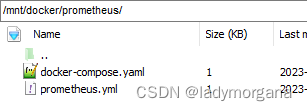
- prometheus.yml
global:scrape_interval:     15s # Set the scrape interval to every 15 seconds. Default is every 1 minute.evaluation_interval: 15s # Evaluate rules every 15 seconds. The default is every 1 minute.# scrape_timeout is set to the global default (10s).# Alertmanager configuration
alerting:alertmanagers:- static_configs:- targets:# - alertmanager:9093# Load rules once and periodically evaluate them according to the global 'evaluation_interval'.
rule_files:# - "first_rules.yml"# - "second_rules.yml"# A scrape configuration containing exactly one endpoint to scrape:
# Here it's Prometheus itself.
scrape_configs:# The job name is added as a label `job=` to any timeseries scraped from this config.- job_name: 'prometheus'# metrics_path defaults to '/metrics'# scheme defaults to 'http'.static_configs:- targets: ['localhost:9090'] - docker-compose.yaml
查看 prom/prometheus 版本信息 Docker
version: '3.1'services:prometheus:image: prom/prometheus:latestcontainer_name: prometheusports:- 9090:9090restart: alwaysvolumes: - ./prometheus.yml:/etc/prometheus/prometheus.yml3.2 运行如下指令
- 进入目录
cd /mnt/docker/prometheus/- 安装prometheus
docker-compose up -d- 查看prometheus运行状态 - docker ps
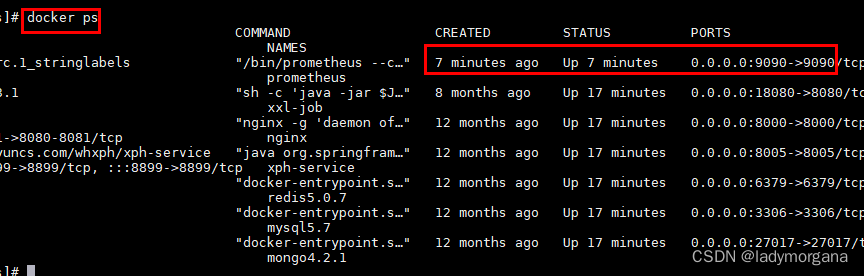
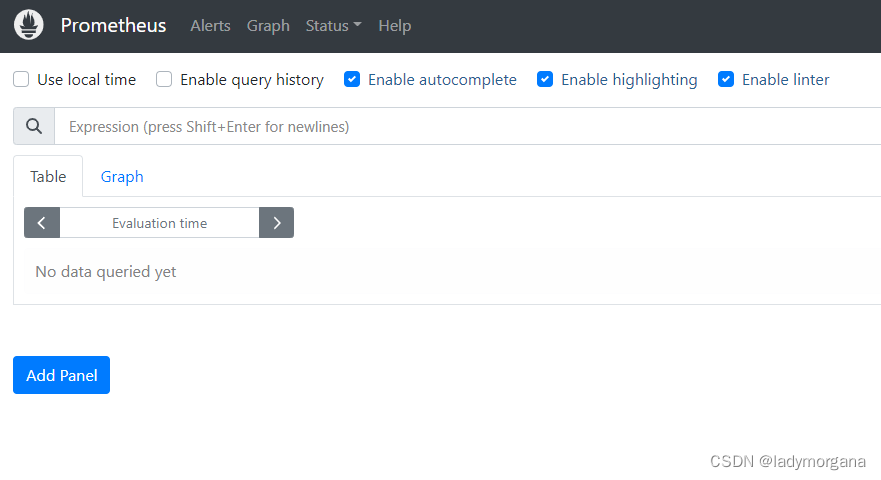
- 查看prometheus界面
| cd /mnt/docker/prometheus/ | ||
| docker-compose up -d | ||
| docker ps | 安装成功后查看docker运行的容器 | |
| http://ip:9090/ | 查看prometheus界面,其中9090 | |
点击进入课程目录
相关内容
热门资讯
健康过春节,营养年夜饭
~2026~ 马年即将来临,“春节”是中国最重要的节日,今年又恰逢首次连休放假九天,走亲访友,亲人团...
林芝桃花节自由行全攻略:第一次...
林芝桃花节自由行全攻略:第一次去西藏看桃花,看这篇就够了 每年三月下旬到四月中旬,当西藏大部分地区还...
春节剩菜大改造!这样做,剩菜也...
年夜饭的丰盛,总让家家户户面临同样的“甜蜜烦恼”:吃不完的菜,倒掉可惜,留着又担心不健康。其实,只要...
官宣!四川又一条国家级户外运动...
2月10日,国家体育总局发布2026年第1号公告——“2026年春节假期户外运动精品线路”,我省“乐...