

Springboot+WebUploader优雅实现超大文件的上传(二)
前言
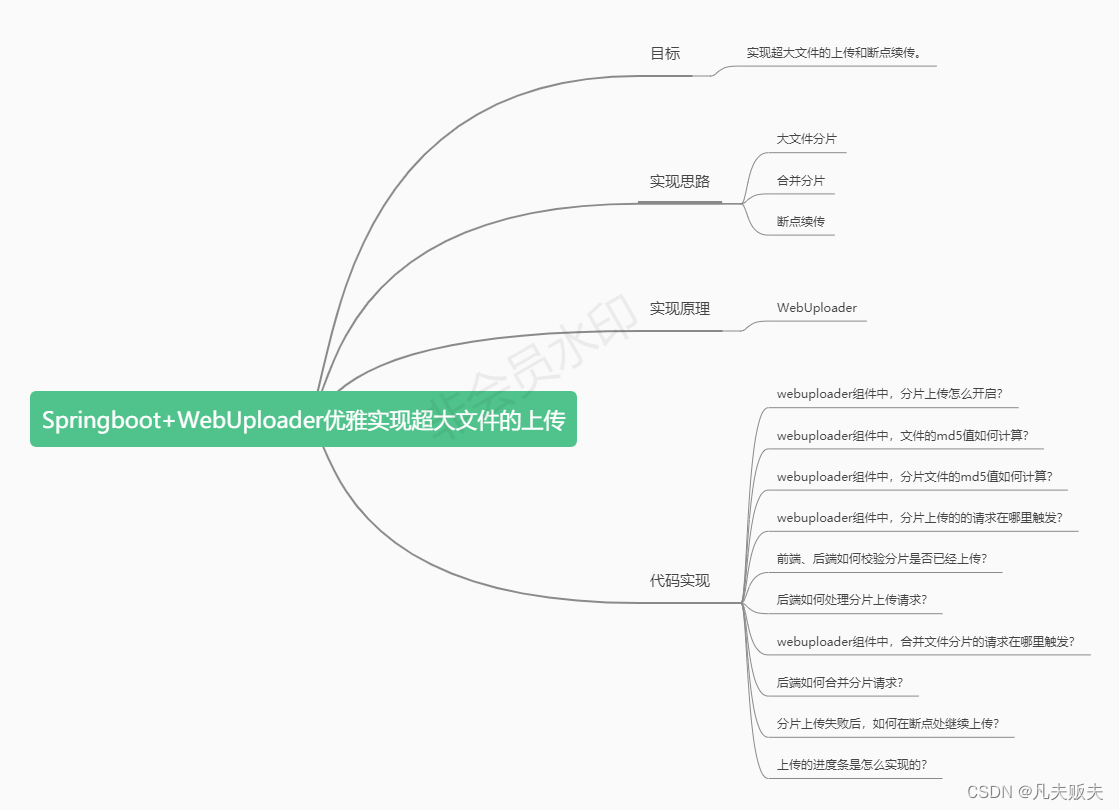
书接前文,欢迎回来!Springboot+WebUploader优雅实现大文件的上传(一),主要讲述了大文件上传的实现思路、实现原理、以及主要的前端代码实现的。这篇文章将重点分析后面几个问题:
5、前端、后端如何校验分片是否已经上传?
6、后端如何处理分片上传请求?
7、webuploader组件中,合并文件分片的请求在哪里触发?
8、后端如何合并分片请求?
9、分片上传失败后,如何在断点处继续上传?
10、上传的进度条是怎么实现的?
代码实现
5、前端、后端如何校验分片是否已经上传?
在webuploader内部的一个command(before-send)已经完成了分片文件的md5计算以及请求后台接口来校验当前分片文件是否已经上传(参见第3个问题),如果已上传,那么会直接跳过当前分片上传接口的调用,uploadBeforeSend事件也不会再触发(当某个分片文件在发送前触发,主要用来询问是否要添加附带参数,大文件在开起分片上传的前提下此事件可能会触发多次);
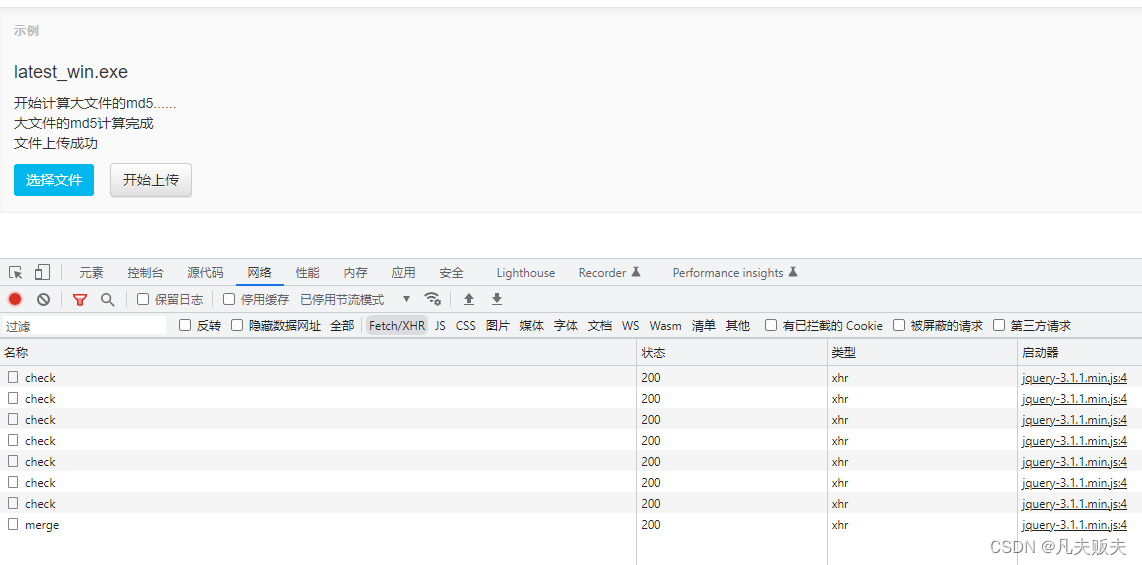
如果未上传,则uploadBeforeSend事件会触发,携带一些分片的参数信息发起分片上传请求;
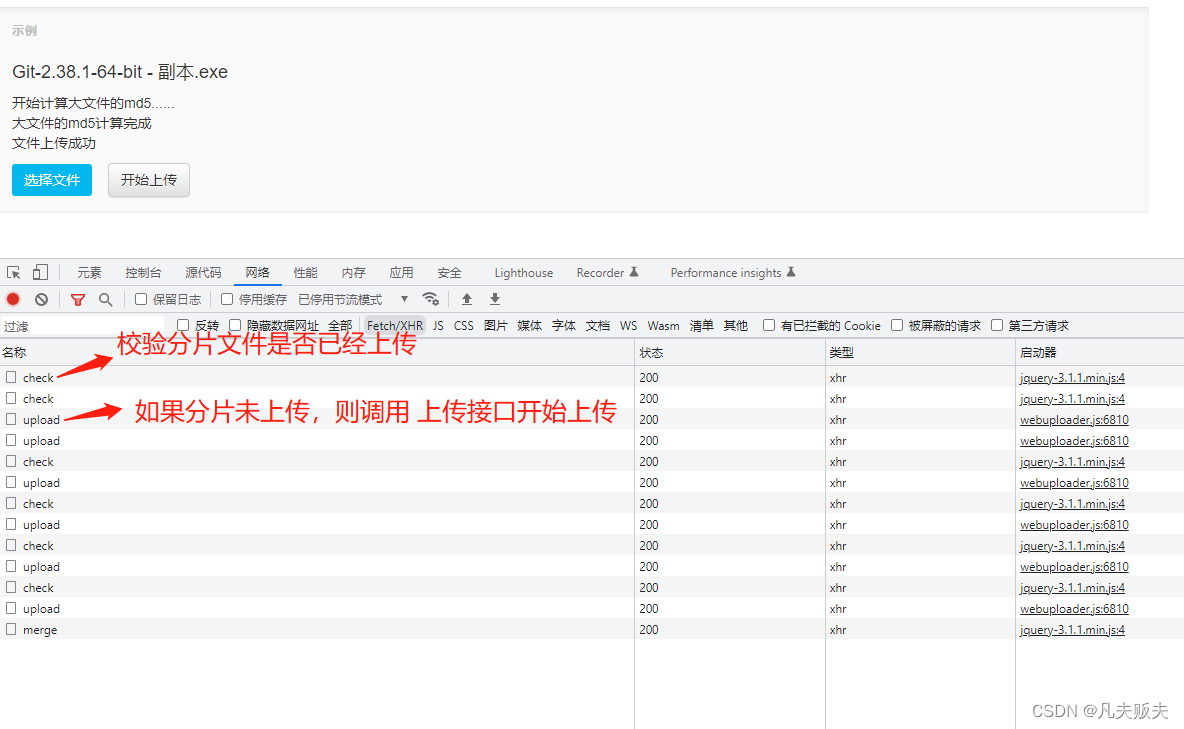
那么后端是如何检验分片是否上传呢?如下:
1、在分片文件上传接口中,分片上传成功后,会保存分片的相关信息,如:分片文件md5、文件md5、文件大小、分片存储位置、分片数据块的起始结束位置、总共分片数量等,这里使用redis缓存了这些分片信息,redis用到了hash数据结构,其中key为文件的md5,hashkey是“chunk_md5_”+分片索引,value就是分片文件的md5值;(当然也可以使用数据库或其他存储介质,)
2、接口被调用的时候,根据前端传过来的当前分片的索引位置取出分片的md5与前端传过来的分片文件md5进行比较,如果相同,则说明当前分片已经上传成功;如果不相同,则说明未上传过;
@PostMapping("/check")
public boolean check(String fileMd5,String chunk,String chunkMd5) {Object o = redisTemplate.opsForHash().get(fileMd5, "chunk_md5_"+chunk);if (chunkMd5.equals(o)) {return true;}return false;
}
6、后端如何处理分片上传请求?
后端在处理分片上传时主要做了两件事:
第一,把分片文件保存在磁盘上或其他的网络存储介质上,这里需要注意一下分片文件的命名规则,尽量有规律一些,方便后面合并分片;这里分片文件的命名规则是:分片md5值+分片索引位置;
第二、保存分片相关的信息,在实际业务开发中可以考虑保存在缓存或数据库里,这里只是作了缓存;缓存的数据结构是hash,key是文件整体的md5值,hashKey与hashValue对应关系如下:
hashKey | hashValue | 描述 |
“chunk_location_”+分片索引位置 | 分片文件的存储绝对路径 | 分片文件的存储位置 |
“chunk_start_end_”+分片索引位置 | “起始位置”+“-”+“结束位置” | 分片文件的在整体文件中字节的起始结束位置 |
"chunk_md5_"+分片索引位置 | 分片文件的md5值 | 分片文件的md5值 |
file_size | 文件整体的字节数大小 | 文件整体的字节数大小 |
file_chunks | 文件整体被分了多少片 | 文件整体被分了多少片 |
/*** 分片上传接口** @param request* @param multipartFile* @return* @throws IOException*/@PostMapping("/upload")public String upload(HttpServletRequest request, MultipartFile multipartFile) {log.info("分片上传....");Map requestParam = this.doRequestParam(request);String md5Value = requestParam.get("md5Value");//整体文件的md5值String chunkIndex = requestParam.get("chunk");//分片在所有分片文件中索引位置String start = requestParam.get("start");//当前分片在整个数据文件中的开始位置String end = requestParam.get("end");//当前分片在整个数据文件中的结束位置String chunks = requestParam.get("chunks");//整体文件总共被分了多少片String fileSize = requestParam.get("size");//整体文件大小String chunkMd5 = requestParam.get("chunkMd5");//分片文件的md5值String userDir = System.getProperty("user.dir");String chunkFilePath = userDir + File.separator + chunkMd5 + "_" + chunkIndex;File file = new File(chunkFilePath);try {multipartFile.transferTo(file);Map map = new HashMap<>();map.put("chunk_location_" + chunkIndex, chunkFilePath);//分片存储路径map.put("chunk_start_end_" + chunkIndex, start + "_" + end);map.put("file_size", fileSize);map.put("file_chunks", chunks);map.put("chunk_md5_" + chunkIndex, chunkMd5);redisTemplate.opsForHash().putAll(md5Value, map);} catch (IOException e) {e.printStackTrace();} catch (IllegalStateException e) {e.printStackTrace();}return "success";} 7、webuploader组件中,合并文件分片的请求在哪里触发?
webuploader组件中,有一对事件分别是uploadSuccess和uploadError,当文件上传成功时,uploadSuccess触发;当文件上传失败时,uploadError触发;因此uploadSuccess事件刚好可以用来,向后台发起合并分片文件的请求;
//当文件上传成功时触发
uploader.on('uploadSuccess', function (file) {//大文件的所有分片上传成功后,请求后端对分片进行合并$.ajax({url: 'http://localhost:8080/file/merge',method: 'post',data: {'md5Value': file.wholeMd5, 'originalFilename': file.name},success: function (res) {alert('大文件上传成功!')}})$('#' + file.id).find('p.state').append('文件上传成功
');
});
8、后端如何合并分片请求?
当所有的分片文件上传成功时会触发webuploader的uploadSuccess事件触发时机,然后调用后台的合并分片文件接口,合并分片文件接口的主要业务逻辑:
1、检验一下所有的分片是否全部上传完成(当分片上传成功时,会把分片md5值和文件整体总共分了多少片存储在redis里,存储时的hashKey是"chunk_md5_"+分片索引位置和file_chunks,如果存储的分片md5的数量与文件整体分片的数量一致,则表示所有的分片均已上传);
/*** 合并分片前检验文件整体的所有分片是否全部上传** @param key* @return*/
private boolean checkBeforeMerge(String key) {Map map = redisTemplate.opsForHash().entries(key);Object file_chunks = map.get("file_chunks");int i = 0;for (Object hashKey : map.keySet()) {if (hashKey.toString().startsWith("chunk_md5_")) {++i;}}if (Integer.valueOf(file_chunks.toString())==(i)) {return true;}return false;
}
2、如果当前文件文件已经上传过,只是名字不同,那么md5值是相同的,直接拿出已经上传的文件按现在名字再复制一份;
3、在开始合并分片文件前,要先从redis中取出分片文件的存储位置,这里要特别注意一下,分片合并的顺序一定与索引位置的升序一致,否则合并的文件是无法打开或运行的;因为分片上传的过程是并发执行的,到达后端的顺序可能每次都不一样,但是各分片的索引位置不会变;因此可以在[0,文件分片总数量-1]之间遍历,从redis中依次取出分片文件的存储路径,并依次写入到一个新的文件里;
4、各个分片文件依次写入完成后,关闭输入流、输出流,并删除分片文件(分片合并成完整文件的时候,分片文件就没有用了,另外缓存的分片其他相关信息也没有用了,也可以删除了,当然在实际业务开发中,可根据具体的需求酌情保留);
/*** 合并分片文件接口** @param request* @return* @throws IOException*/
@PostMapping("/merge")
public String merge(HttpServletRequest request) throws IOException {log.info("合并分片...");Map requestParam = this.doRequestParam(request);String md5Value = requestParam.get("md5Value");String originalFilename = requestParam.get("originalFilename");//校验切片是否己经上传完毕boolean flag = this.checkBeforeMerge(md5Value);if (!flag) {return "切片未完全上传";}//检查是否已经有相同md5值的文件上传;主要是对名字不同,而实际文件相同的文件,直接对原文件进行复制;Object file_location = redisTemplate.opsForHash().get(md5Value, "file_location");if (file_location != null) {String source = file_location.toString();File file = new File(source);if (!file.getName().equals(originalFilename)) {File target = new File(System.getProperty("user.dir") + File.separator + originalFilename);Files.copy(file.toPath(), target.toPath());return "success";}}//这里要特别注意,合并分片的时候一定要按照分片的索引顺序进行合并,否则文件无法使用;Integer file_chunks = Integer.valueOf(redisTemplate.opsForHash().get(md5Value, "file_chunks").toString());String userDir = System.getProperty("user.dir");File writeFile = new File(userDir + File.separator + originalFilename);OutputStream outputStream = new FileOutputStream(writeFile);InputStream inputStream = null;for (int i = 0; i < file_chunks; i++) {String tmpPath = redisTemplate.opsForHash().get(md5Value,"chunk_location_" + i).toString();File readFile = new File(tmpPath);inputStream = new FileInputStream(readFile);byte[] bytes = new byte[1024 * 1024];while ((inputStream.read(bytes) != -1)) {outputStream.write(bytes);}if (inputStream != null) {inputStream.close();}}if (outputStream != null) {outputStream.close();}redisTemplate.opsForHash().put(md5Value, "file_location", userDir + File.separator + originalFilename);this.delTmpFile(md5Value);return "success";
}
private void delTmpFile(String md5Value) throws JsonProcessingException {Map map = redisTemplate.opsForHash().entries(md5Value);List list = new ArrayList<>();for (Object hashKey : map.keySet()) {if (hashKey.toString().startsWith("chunk_location")) {String filePath = map.get(hashKey).toString();File file = new File(filePath);boolean flag = file.delete();list.add(hashKey.toString());log.info("delete:" + filePath + ",:" + flag);}if (hashKey.toString().startsWith("chunk_start_end_")) {list.add(hashKey.toString());}if (hashKey.toString().startsWith("chunk_md5_")) {list.add(hashKey.toString());}}list.add("file_chunks");list.add("file_size");redisTemplate.opsForHash().delete(md5Value, list.toArray());
}
9、分片上传失败后,如何在断点处继续上传?
在第3个问题、第5个问题中,已经解决了这个问题,webuploader内部一个command(before-send)会触发,这时计算分片文件的md5值,并携带分片文件的md5值调用后台的校验接口;如果已上传,那么会直接跳过当前分片上传接口的调用;如果未上传,则会只上传未上传的的那个分片文件;
10、上传的进度条是怎么实现的?
webuploader的uploadProgress事件在上传过程中触发,会携带上传进度参数;
// 文件上传过程中创建进度条实时显示
uploader.on('uploadProgress', function (file, percentage) {var $li = $('#' + file.id),$percent = $li.find('.progress .progress-bar');if (!$percent.length) {$percent = $('' +'' +'' +'').appendTo($li).find('.progress-bar');}$percent.css('width', percentage * 100 + '%');
});
总结
想要完整说清楚一件事,确实不容易,不知道我究间说明白了没,我感觉我是说明白了,评论区告诉我吧。
1、对于后端来说,大部分时候写的程序都是同步顺序执行的,但前端的异步执行很常见,通过这篇文章又重新学习了promise、deferred的使用;
2、不要以为看懂了一篇文章,就真的懂了,纸上得来终觉浅,绝知此事须躬行,还是得上手自己验证一翻,别人说的未必是对的,或者说在作者当时的场景下是对的,如何确定你的场景和他的是否相同?所以小编这里希望,大家多提问题,共同讨论,共同进步。
下面附上所有完整的的示例文件以供小伙伴们参考:
FileController.java
@RestController
@RequestMapping("/file")
@Slf4j
public class FileController {@Resourceprivate RedisTemplate redisTemplate;/*** 检验分片文件是否已经上传过** @param fileMd5  整体文件md5值* @param chunk    当前上传分片在所有分片文件中索引位置* @param chunkMd5 分片文件的md5值* @return*/@PostMapping("/check")public boolean check(String fileMd5, String chunk, String chunkMd5) {Object o = redisTemplate.opsForHash().get(fileMd5, "chunk_md5_" + chunk);if (chunkMd5.equals(o)) {return true;}return false;}/*** 分片上传接口** @param request* @param multipartFile* @return* @throws IOException*/@PostMapping("/upload")public String upload(HttpServletRequest request, MultipartFile multipartFile) {log.info("分片上传....");Map requestParam = this.doRequestParam(request);String md5Value = requestParam.get("md5Value");//整体文件的md5值String chunkIndex = requestParam.get("chunk");//分片在所有分片文件中索引位置String start = requestParam.get("start");//当前分片在整个数据文件中的开始位置String end = requestParam.get("end");//当前分片在整个数据文件中的结束位置String chunks = requestParam.get("chunks");//整体文件总共被分了多少片String fileSize = requestParam.get("size");//整体文件大小String chunkMd5 = requestParam.get("chunkMd5");//分片文件的md5值String userDir = System.getProperty("user.dir");String chunkFilePath = userDir + File.separator + chunkMd5 + "_" + chunkIndex;File file = new File(chunkFilePath);try {multipartFile.transferTo(file);Map map = new HashMap<>();map.put("chunk_location_" + chunkIndex, chunkFilePath);//分片存储路径map.put("chunk_start_end_" + chunkIndex, start + "_" + end);map.put("file_size", fileSize);map.put("file_chunks", chunks);map.put("chunk_md5_" + chunkIndex, chunkMd5);redisTemplate.opsForHash().putAll(md5Value, map);} catch (IOException e) {e.printStackTrace();} catch (IllegalStateException e) {e.printStackTrace();}return "success";}/*** 合并分片文件接口** @param request* @return* @throws IOException*/@PostMapping("/merge")public String merge(HttpServletRequest request) throws IOException {log.info("合并分片...");Map requestParam = this.doRequestParam(request);String md5Value = requestParam.get("md5Value");String originalFilename = requestParam.get("originalFilename");//校验切片是否己经上传完毕boolean flag = this.checkBeforeMerge(md5Value);if (!flag) {return "切片未完全上传";}//检查是否已经有相同md5值的文件上传;主要是对名字不同,而实际文件相同的文件,直接对原文件进行复制;Object file_location = redisTemplate.opsForHash().get(md5Value, "file_location");if (file_location != null) {String source = file_location.toString();File file = new File(source);if (!file.getName().equals(originalFilename)) {File target = new File(System.getProperty("user.dir") + File.separator + originalFilename);Files.copy(file.toPath(), target.toPath());return "success";}}//这里要特别注意,合并分片的时候一定要按照分片的索引顺序进行合并,否则文件无法使用;Integer file_chunks = Integer.valueOf(redisTemplate.opsForHash().get(md5Value, "file_chunks").toString());String userDir = System.getProperty("user.dir");File writeFile = new File(userDir + File.separator + originalFilename);OutputStream outputStream = new FileOutputStream(writeFile);InputStream inputStream = null;for (int i = 0; i < file_chunks; i++) {String tmpPath = redisTemplate.opsForHash().get(md5Value,"chunk_location_" + i).toString();File readFile = new File(tmpPath);inputStream = new FileInputStream(readFile);byte[] bytes = new byte[1024 * 1024];while ((inputStream.read(bytes) != -1)) {outputStream.write(bytes);}if (inputStream != null) {inputStream.close();}}if (outputStream != null) {outputStream.close();}redisTemplate.opsForHash().put(md5Value, "file_location", userDir + File.separator + originalFilename);this.delTmpFile(md5Value);return "success";}@GetMapping("/download")public String download(String fileName, HttpServletResponse response) throws IOException {response.setContentType("application/octet-stream");response.setHeader("Content-Disposition", "attachment; filename=" + URLEncoder.encode(fileName, "UTF-8"));String userDir = System.getProperty("user.dir");File file = new File(userDir + File.separator + fileName);InputStream inputStream = new FileInputStream(file);byte[] bytes = new byte[1024 * 1024];ServletOutputStream outputStream = response.getOutputStream();while (inputStream.read(bytes) != -1) {outputStream.write(bytes);}inputStream.close();outputStream.close();return "success";}private void delTmpFile(String md5Value) throws JsonProcessingException {Map map = redisTemplate.opsForHash().entries(md5Value);List list = new ArrayList<>();for (Object hashKey : map.keySet()) {if (hashKey.toString().startsWith("chunk_location")) {String filePath = map.get(hashKey).toString();File file = new File(filePath);boolean flag = file.delete();list.add(hashKey.toString());log.info("delete:" + filePath + ",:" + flag);}if (hashKey.toString().startsWith("chunk_start_end_")) {list.add(hashKey.toString());}if (hashKey.toString().startsWith("chunk_md5_")) {list.add(hashKey.toString());}}list.add("file_chunks");list.add("file_size");redisTemplate.opsForHash().delete(md5Value, list.toArray());}private Map doRequestParam(HttpServletRequest request) {Map requestParam = new HashMap<>();Enumeration parameterNames = request.getParameterNames();while (parameterNames.hasMoreElements()) {String paramName = parameterNames.nextElement();String paramValue = request.getParameter(paramName);requestParam.put(paramName, paramValue);log.info(paramName + ":" + paramValue);}log.info("----------------------------");return requestParam;}/*** 合并分片前检验文件整体的所有分片是否全部上传** @param key* @return*/private boolean checkBeforeMerge(String key) {Map map = redisTemplate.opsForHash().entries(key);Object file_chunks = map.get("file_chunks");int i = 0;for (Object hashKey : map.keySet()) {if (hashKey.toString().startsWith("chunk_md5_")) {++i;}}if (Integer.valueOf(file_chunks.toString())==(i)) {return true;}return false;}
}
webuploader2.html
Title
选择文件