

【Unity】AI实战应用——Unity接入ChatGPT和对游戏开发实际应用的展望
几个资本大佬花钱让一群程序员研发出了AI,砸了程序员的大锅。尤其是ChatGPT 4.0发布后,认识的同事朋友们都在恐慌AI的发展,甚至有不少人开始抗拒。我的观点是:人工智能是大势所趋,势不可挡,那就驾驭它吧!
我司已经在商业项目中实际使用了AI, 包括Stable Diffusion及其扩展插件,当然也有爆火的ChatGPT。
Stable Diffusion + ControlNET + Lora以及Photoshop Stable Diffusion 等插件的结合使用已经强大到基本取代初中级原画师;
ChatGPT 4.0势头已经咄咄逼人,据说下一代会进化到运行时处理功能,比如对磁盘的读写等。用户让ChatGPT“创建一个cs代码”,它就能在电脑硬盘里创建一个代码文件。个人觉得任重道远,功能越强责任越大,如果没有有效解决安全问题之前,这一步很难到来。
ChatGPT已经能全面应用到游戏开发的各个环节了,策划的剧情设定、技术的代码编写优化、测试的测试用例等。我从去年12月开始使用ChatGPT,完全把它当成了一个搜索引擎,自从有了它几乎没使用多少次谷歌百度。4.0的到来彻底激发了我对ChatGPT实际应用的思考。
首先第一步肯定是先把ChatGPT接入Unity,先建立起通讯,以此为基础各种应用功能才能百花齐放。
用Unity EditorWindow实现ChatGPT对话窗口:
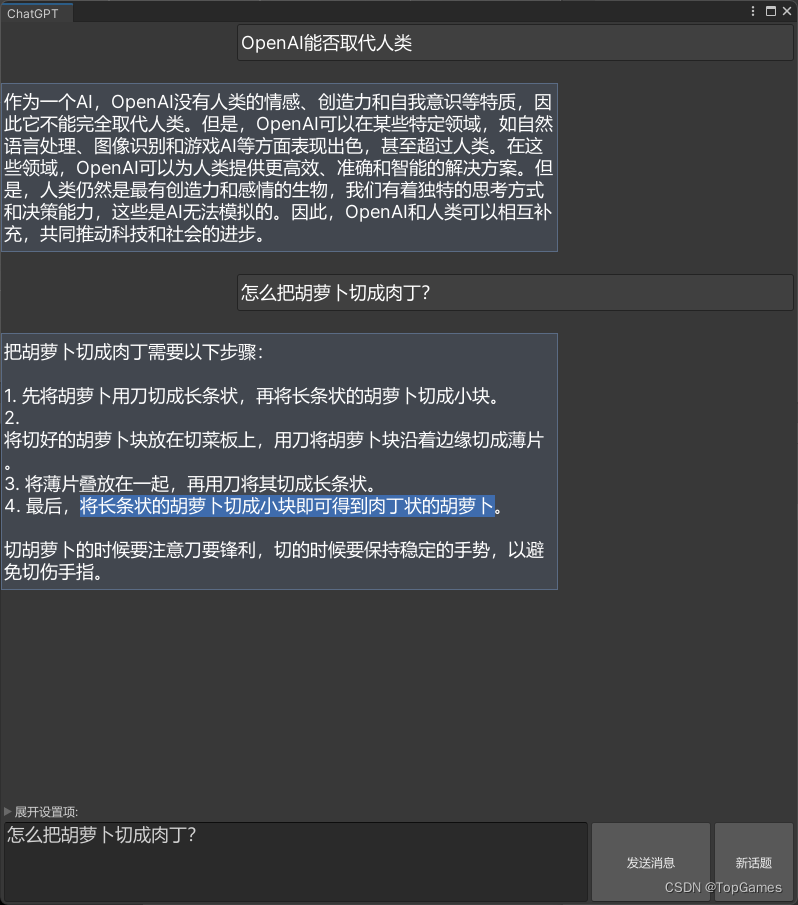
ChatGPT接口实现:
用UnityWebRequest实现一个与ChatGPT通讯的类,之后的各种功能基于此类。
一,获取API Key
ChatGPT提供了开放接口,仅需一个个人版的API Key就可以接入ChatGPT, API Key获取入口:https://platform.openai.com/account/api-keys
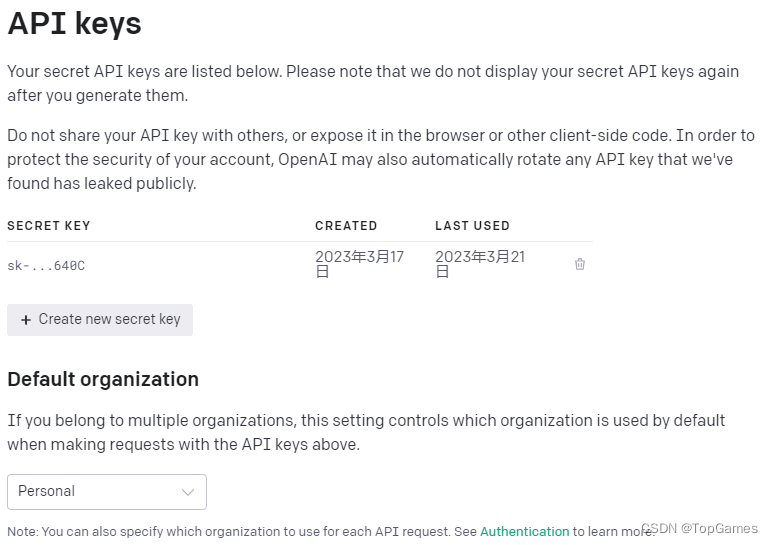
二,使用UnityWebRequest发送Post请求和接收ChatGPT返回信息
ChatGPT URL: https://api.openai.com/v1/chat/completions
上行数据结构如下:
{"messages": [{"role": "user","content": "你是机器人吗"//要发送的问题}],"model": "gpt-3.5-turbo",//AI数据模型"temperature": 0.7 //默认是1, 数值越大结果随机性越高
}
下行数据结构如下:
{"id": "chatcmpl-xxxxxxxxxxxxxxxxxx","object": "chat.completion","created": 1678987654,"model": "gpt-3.5-turbo-0301","usage": {"prompt_tokens": 14,"completion_tokens": 23,"total_tokens": 37},"choices": [{"message": {"role": "assistant","content": "\n\n是的,我是一个AI语言模型,也可以被称为机器人。" //得到的回复},"finish_reason": "stop","index": 0}]
}
使用UnityWebRequest发送Post请求:
var msg = new Message(){role = UserId,content = input,};requestData.AppendChat(msg);using (UnityWebRequest webRequest = new UnityWebRequest(ChatgptUrl, "POST")){var jsonDt = UtilityBuiltin.Json.ToJson(requestData);Debug.Log(jsonDt);byte[] bodyRaw = Encoding.UTF8.GetBytes(jsonDt);webRequest.uploadHandler = new UploadHandlerRaw(bodyRaw);webRequest.downloadHandler = new DownloadHandlerBuffer();webRequest.SetRequestHeader("Content-Type", "application/json");webRequest.SetRequestHeader("Authorization", $"Bearer {this.ApiKey}");var req = webRequest.SendWebRequest();for (var progress = 0.0f; !req.isDone; progress += 0.01f){EditorUtility.DisplayProgressBar("ChatGPT Requesting...", "Waiting...", progress);System.Threading.Thread.Sleep(100);progress += 0.01f;}EditorUtility.ClearProgressBar();var json = webRequest.downloadHandler.text;Debug.Log(json);try{ChatCompletion result = UtilityBuiltin.Json.ToObject(json);int lastChoiceIdx = result.choices.Count - 1;var replyMsg = result.choices[lastChoiceIdx].message;replyMsg.content = replyMsg.content.Trim();messageHistory.Add(replyMsg);return replyMsg.content;}catch (System.Exception){EditorUtility.DisplayDialog("ChatGPT请求错误!", json, "YES");return "";}} 以上就是向ChatGPT发送请求并接受回复的核心代码,非常简单。然而不出意外的话会出现请求0报错:Cert verify failed: UNITYTLS_X509VERIFY_FLAG_CN_MISMATCH, https请求证书验证失败的报错。
所以我们还需要自定义验证类,直接跳过验证返回true:
class ChatGPTWebRequestCert : UnityEngine.Networking.CertificateHandler{protected override bool ValidateCertificate(byte[] certificateData){//return base.ValidateCertificate(certificateData);return true;}}然后为UnityWebRequest势力指定验证Handler:
webRequest.certificateHandler = new ChatGPTWebRequestCert();再次运行就能正常接收数据了。
完整代码:
using System.Collections.Generic;
using System.Text;
using UnityEditor;
using UnityEngine;
using UnityEngine.Networking;namespace UnityGameFramework.Editor.AIAssistant
{public class ChatGPT{const string ChatgptUrl = "https://api.openai.com/v1/chat/completions";const string DefaultAPIKey = "sk-替换为自己的API Key";const string DefaultModel = "gpt-3.5-turbo";const float DefaultTemperature = 0.7f;const string DefaultUserId = "user";string ApiKey;string UserId;List messageHistory;public List MessageHistory => messageHistory;ChatGPTRequestData requestData;public ChatGPT(string apiKey = DefaultAPIKey, string userId = DefaultUserId, string model = DefaultModel, float temperature = DefaultTemperature){this.ApiKey = apiKey;this.UserId = string.IsNullOrWhiteSpace(userId) ? DefaultUserId : userId;messageHistory = new List();requestData = new ChatGPTRequestData(model, temperature);}/// /// 接着上次的话题/// public void RestoreChatHistory(){var chatHistoryJson = EditorPrefs.GetString("ChatGPT.Settings.ChatHistory", string.Empty);var requestDataJson = EditorPrefs.GetString("ChatGPT.Settings.RequestData", string.Empty);if (!string.IsNullOrEmpty(chatHistoryJson)){var jsonObj = UtilityBuiltin.Json.ToObject(requestDataJson);if (jsonObj != null){requestData.messages = jsonObj.messages;}}if (!string.IsNullOrEmpty(requestDataJson)){var jsonObj = UtilityBuiltin.Json.ToObject>(chatHistoryJson);if (jsonObj != null){messageHistory = jsonObj;}}}public void SaveChatHistory(){var chatHistoryJson = UtilityBuiltin.Json.ToJson(messageHistory);var requestDataJson = UtilityBuiltin.Json.ToJson(requestData);EditorPrefs.SetString("ChatGPT.Settings.ChatHistory", chatHistoryJson);EditorPrefs.SetString("ChatGPT.Settings.RequestData", requestDataJson);}public string Request(string input){var msg = new Message(){role = UserId,content = input,};requestData.AppendChat(msg);messageHistory.Add(msg);using (UnityWebRequest webRequest = new UnityWebRequest(ChatgptUrl, "POST")){var jsonDt = UtilityBuiltin.Json.ToJson(requestData);Debug.Log(jsonDt);byte[] bodyRaw = Encoding.UTF8.GetBytes(jsonDt);webRequest.uploadHandler = new UploadHandlerRaw(bodyRaw);webRequest.downloadHandler = new DownloadHandlerBuffer();webRequest.SetRequestHeader("Content-Type", "application/json");webRequest.SetRequestHeader("Authorization", $"Bearer {this.ApiKey}");webRequest.certificateHandler = new ChatGPTWebRequestCert();var req = webRequest.SendWebRequest();//此处为了测试强制阻塞进程等待ChatGPT回应,应当改为异步且不影响其它操作进行for (var progress = 0.0f; !req.isDone; progress += 0.01f){EditorUtility.DisplayProgressBar("ChatGPT Requesting...", "Waiting...", progress);System.Threading.Thread.Sleep(100);progress += 0.01f;}EditorUtility.ClearProgressBar();var json = webRequest.downloadHandler.text;Debug.Log(json);try{ChatCompletion result = UtilityBuiltin.Json.ToObject(json);int lastChoiceIdx = result.choices.Count - 1;var replyMsg = result.choices[lastChoiceIdx].message;replyMsg.content = replyMsg.content.Trim();messageHistory.Add(replyMsg);return replyMsg.content;}catch (System.Exception){EditorUtility.DisplayDialog("ChatGPT请求错误!", json, "YES");return "";}}}public void NewChat(){requestData.ClearChat();messageHistory.Clear();}public bool IsSelfMessage(Message msg){return this.UserId.CompareTo(msg.role) == 0;}}class ChatGPTRequestData{public List messages;public string model;public float temperature;public ChatGPTRequestData(string model, float temper){this.model = model;this.temperature = temper;this.messages = new List();}/// /// 同一话题追加会话内容/// /// /// /// 清除聊天历史(结束一个话题), 相当于新建一个聊天话题/// public void ClearChat(){this.messages.Clear();}}class ChatGPTWebRequestCert : UnityEngine.Networking.CertificateHandler{protected override bool ValidateCertificate(byte[] certificateData){//return base.ValidateCertificate(certificateData);return true;}}class Usage{public int prompt_tokens;public int completion_tokens;public int total_tokens;}public class Message{public string role;public string content;}class Choice{public Message message;public string finish_reason;public int index;}class ChatCompletion{public string id;public string @object;public int created;public string model;public Usage usage;public List choices;}
} 使用用法:
new ChatGPT("ChatGPT API Key").Request("你是机器人吗?")三,基于上面的ChatGPT类实现一个ChatGPT聊天窗口
为什么要写个聊天窗口:
1. https://chat.openai.com/chat 网页版登陆锁IP,禁止大陆IP登录,并且会验证时区,如果用美国的节点时区时间对不上拒绝登录,所以每次只能用台湾省的节点登录。
2. 虽然登录成功后不科学也能用,但是同一话题很快就会超时无法应答,刷新界面或新建话题才能正常使用,总之非常鸡肋。
而通过开放接口就没有这些问题,API请求会更加爽快。
聊天窗口功能设计:
1. 需要一个滚动列表展示双方对话记录,对话文本内容支持选择复制。
2. 问题输入框和发送按钮、新建话题(清除话题对话)
3. 对话历史存档。
代码实现,比较简单就不解释了,直接上源码:
using System;
using UnityEditor;
using UnityEngine;namespace UnityGameFramework.Editor.AIAssistant
{[EditorToolMenu("AI助手/ChatGPT", 5)]public class ChatGPTWindow : EditorToolBase{public override string ToolName => "ChatGPT";Vector2 scrollPos = Vector2.zero;ChatGPT ai;private bool settingFoldout = false;string message;private float chatBoxPadding = 20;private float chatBoxEdgePadding = 10;GUIStyle myChatStyle;GUIStyle aiChatStyle;GUIStyle txtAreaStyle;GUIContent chatContent;bool isEditorInitialized = false;private void OnEnable(){EditorApplication.update += OnEditorUpdate;ai = new ChatGPT(AppBuildSettings.Instance.ChatGPTKey);chatContent = new GUIContent();ai.RestoreChatHistory();}private void OnEditorUpdate(){if (EditorApplication.isCompiling || EditorApplication.isUpdating){return;}try{InitGUIStyles();isEditorInitialized = true;EditorApplication.update -= OnEditorUpdate;}catch (Exception){}}private void InitGUIStyles(){aiChatStyle = new GUIStyle(EditorStyles.selectionRect);aiChatStyle.wordWrap = true;aiChatStyle.normal.textColor = Color.white;aiChatStyle.fontSize = 18;aiChatStyle.alignment = TextAnchor.MiddleLeft;myChatStyle = new GUIStyle(EditorStyles.helpBox);myChatStyle.wordWrap = true;myChatStyle.normal.textColor = Color.white;myChatStyle.fontSize = 18;myChatStyle.alignment = TextAnchor.MiddleLeft;txtAreaStyle = new GUIStyle(EditorStyles.textArea);txtAreaStyle.fontSize = 18;}private void OnDisable(){ai.SaveChatHistory();}private void OnGUI(){if (!isEditorInitialized) return;EditorGUILayout.BeginVertical();{scrollPos = EditorGUILayout.BeginScrollView(scrollPos);{foreach (var msg in ai.MessageHistory){EditorGUILayout.BeginVertical();{EditorGUILayout.BeginHorizontal();{bool isMyMsg = ai.IsSelfMessage(msg);var labelStyle = isMyMsg ? myChatStyle : aiChatStyle;chatContent.text = msg.content;float chatBoxWidth = this.position.width * 0.7f;float chatBoxHeight = chatBoxEdgePadding + labelStyle.CalcHeight(chatContent, chatBoxWidth - chatBoxEdgePadding);if (isMyMsg) { GUILayout.FlexibleSpace(); }EditorGUILayout.SelectableLabel(msg.content, labelStyle, GUILayout.Width(chatBoxWidth), GUILayout.Height(chatBoxHeight));if (!isMyMsg) { GUILayout.FlexibleSpace(); }EditorGUILayout.EndHorizontal();}EditorGUILayout.EndVertical();}EditorGUILayout.Space(chatBoxPadding);}EditorGUILayout.EndScrollView();}GUILayout.FlexibleSpace();if (settingFoldout = EditorGUILayout.Foldout(settingFoldout, "展开设置项:")){EditorGUILayout.BeginHorizontal("box");{EditorGUILayout.LabelField("ChatGPT API Key:", GUILayout.Width(170));AppBuildSettings.Instance.ChatGPTKey = EditorGUILayout.TextField(AppBuildSettings.Instance.ChatGPTKey);EditorGUILayout.EndHorizontal();}}EditorGUILayout.BeginHorizontal();{message = EditorGUILayout.TextArea(message, txtAreaStyle, GUILayout.MinHeight(80));if (GUILayout.Button("发送消息", GUILayout.MaxWidth(120), GUILayout.Height(80))){if (!string.IsNullOrWhiteSpace(message)){ai.Request(message);scrollPos.y = 1;}}if (GUILayout.Button("新话题", GUILayout.MaxWidth(80), GUILayout.Height(80))){ai.NewChat();}EditorGUILayout.EndHorizontal();}EditorGUILayout.EndVertical();}}}
}
添加代码后,Toolbar的Tools工具栏会自动识别这个工具菜单,点击即可打开ChatGPT对话窗口:
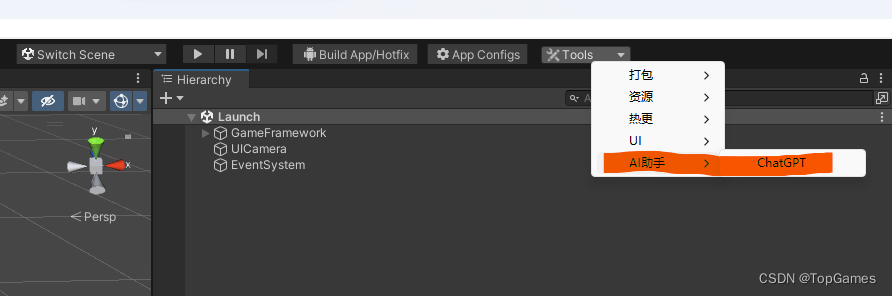
ChatGPT应用展望:
下一步就是为ChatGPT赋予双手,添加各种指令Handler。比如生成json文件、生成语言国际化Excel文件、修改优化代码、生成代码文件、生成Shader、一键拼UI等等。
分为两个模块:
1. 描述文本(发送给ChatGPT)
2. 结果解析。得到目标结果,使用Handler解析ChatGPT返回结果,达成某种功能。
最终就可以不用写程序,只写问题的描述文本,确保能从ChatGPT得到满意答案就可以实现某项功能。想要新增新的工具,扩展新的功能只需要在文件中添加修改问题描述文本即可。
比如语言国际化,我通过问题描述让ChatGPT从工程代码中扫描所有语言本地化函数GF.Localization.GetText()传入的国际化文本,并且把文本翻译成中文,把结果以key,value键值对保存输出json文件。最后我得到了ChatGPT返回的诸如{"Hello":”你好“}的所有国际化文本和翻译结果。
然后我只需要解析ChatGPT返回结果,生成语言国际化文件到工程中就完成了AI自动处理语言国际化的问题。