

KubeEdge设备接入应用的调试
创始人
2025-05-29 14:27:55
kubeedge的设备接入采用的是mapper,
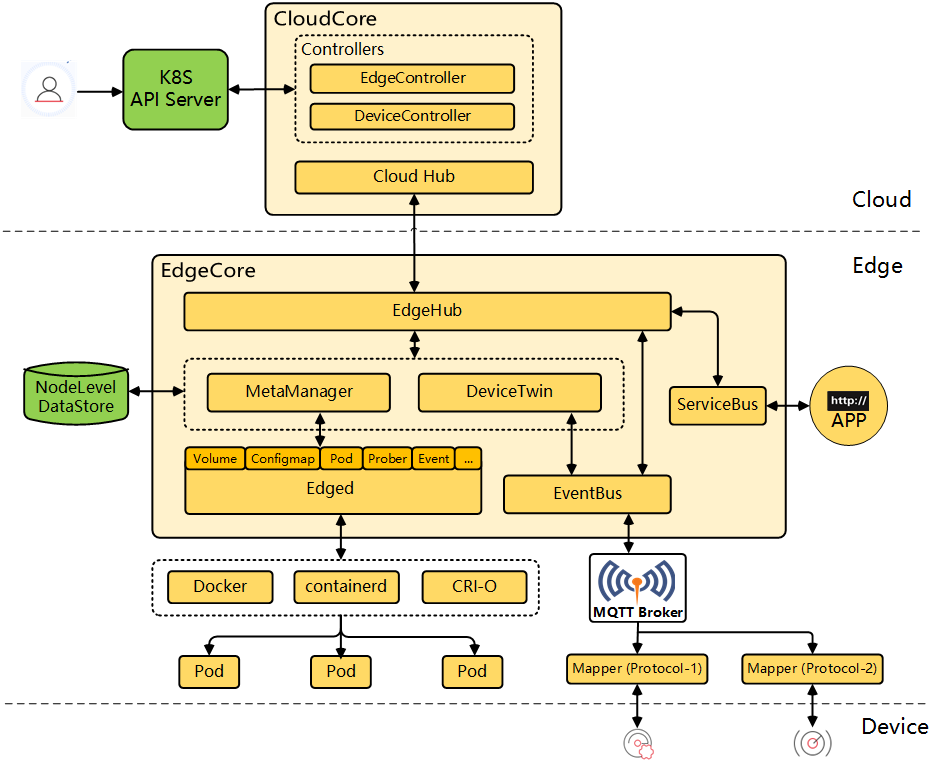
用mapper去适配不同的协议类型。
已经实现的协议在这个地方:
GitHub - kubeedge/mappers-go: KubeEdge Device Mappers written in go
包括modbus, opcua, 蓝牙等。
运行的时候mapper是运行在容器中,会根据云端下发的设备数据,与设备建立连接。
但是在容器中调试非常不便。
其实在容器外面也是可以运行的,只不过需要把云端下发的.json准备好。
以opcua mapper为例。
https://github.com/kubeedge/mappers-go/blob/main/mappers/opcua/config.yaml
这个文件定义configmap: /opt/kubeedge/deviceProfile.json的位置
改成configmap: ./deviceProfile.json
deviceProfile.json的内容从云端拿
kubectl get cm XXXXXXX -o json
就导出了这个边缘节点上的设备信息。
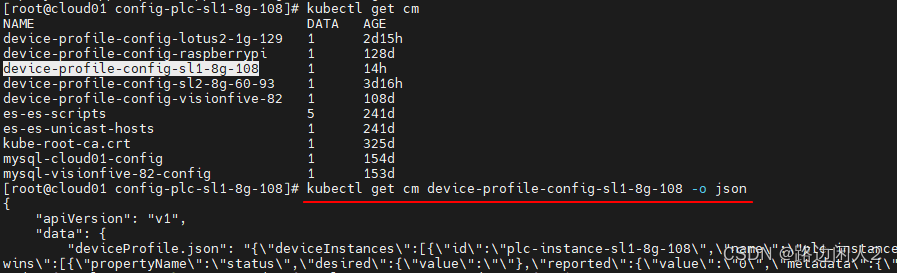
保存到deviceProfile.json中, deviceProfile.json中最后面有几个关于证书的配置,需要修改成本地的证书(mappers-go项目中有)。
以及opcua的参数修改成需要的,就可以运行这个mapper了。
{"deviceInstances": [{"id": "plc-instance-sl1-8g-108","name": "plc-instance-sl1-8g-108","protocol": "opcua-plc-instance-sl1-8g-108","model": "plc-model","twins": [{"propertyName": "status","desired": {"value": ""},"reported": {"value": "0","metadata": {"timestamp": "1678938009371","type": "int"}}}]}],"deviceModels": [{"name": "plc-model","properties": [{"name": "status","dataType": "int","description": "status","accessMode": "ReadOnly","defaultValue": 0,"minimum": 0,"maximum": 0}]}],"protocols": [{"name": "opcua-plc-instance-sl1-8g-108","protocol": "opcua","protocolConfig": {"url": "opc.tcp://127.0.0.1:4840/","userName": "testuser","password": "./ca/pass","securityMode": "None","certificate": "./ca/clientcert.pem","privateKey": "./ca/clientkey.pem"},"protocolCommonConfig": {"customizedValues": {"remoteCertificate": "./ca/servercert.pem"}}}]
}
make mapper 后, 生成的程序在bin/目录下。
./bin/opcua --v 5相关内容
热门资讯
备足“新春礼,”护航“平安游”...
春节脚步渐近,年味日渐浓郁。萍乡武功山景区提前谋划、周密部署、精准发力,从氛围营造、安全保障、活动创...
娄烦县旅游景点必玩推荐
娄烦县,这座充满魅力的小城,宛如一颗被遗落的明珠,散发着独特的旅游气息。它拥有着丰富多样的自然景观和...
详解一下双鸭山必打卡的10个网...
# 双鸭山必打卡的10个网红景点,让你爱上这座山水之城 双鸭山,这座位于黑龙江省东南部的城市,以其独...
实测 2026 贵州包车游!贵...
为什么同样是报贵州定制小团游,有人全程舒心无忧,有人却深陷加价、缩水、推诿的泥潭?结合主流旅游平台投...